The Shift plan is a feature that was integrated in V2.9.0.
The customer has the option to adapt the notification along to a flexible shift planning of employees and not just inside/outside work hours. A typical use case is a 24hour operation in 3 shifts with different users active a different times.
Shift plan |
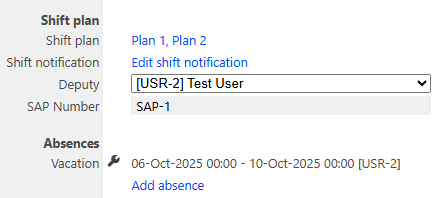
•Multiple Shift plans can be created •A Shift plan is assigned to one or multiple groups. It handles notifications for this groups or child groups •The Shift plan contains a list of shifts with begin- and end time and the users to be notified •A user must be assigned to a shift plan in order to be selectable for notifications •Fallback users can be defined for the case if no shift exist or no user defined for a shift
|
Shift plan setting for the user |
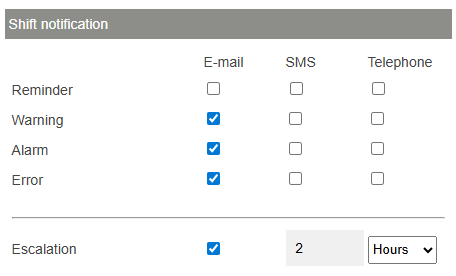
Define channels •E-Mail, SMS or Telefone are selectable separately for each alarm level •Phone calls will be executed to only one user at the same time and iterate the users in the defined repeat interval.
Escalation •Enable escalation with an escalation delay time •If enabled, the user does not receive notifications until the escalation period is expired
|
Shift plan import |
The shiftplan can also be imported using by CSV file. Format:
ame;FromDate;FromTime;ToDate;ToTime;UserIds;SapIds
Name: Name of the shift FromDate: Shift Start (Date) FromTime: Shift Start (Time) ToDate: Shift End (Date) ToTime: Shift End (Time) UserIds: Comma separated list of users for the shift (RMS User Id's) SapIds: Comma separated list of users for the shift (SAP User Id's defined in the user setup)
|
Update V2.9.1 |
When a user logs into RMS beeing in a different time zone then the RMS system time is, an User time zone is displayed additionally at Tools > Setup > Shift plan:
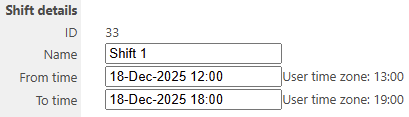
|
Updated: 20.05.2026