
HW4 explorer: expandable subfolders
Hello
I notice that I cannot expand some folders in HW4 explorer. I have some folder under Downloads. But the plus to expand is missing. What kind of folder do the explorer show?
Thank you
I notice that I cannot expand some folders in HW4 explorer. I have some folder under Downloads. But the plus to expand is missing. What kind of folder do the explorer show?
Thank you
Hi Ka Lai, what kind of HW4 explorer do you mean? Could you supply an screenshot?
If you mean: Click on file -> Open -> Choose folder or file within Downloads? That is working at my PC. I can open subfolder.
Cheers
Clemens
If you mean: Click on file -> Open -> Choose folder or file within Downloads? That is working at my PC. I can open subfolder.
Cheers
Clemens
Hi Clemens
There are three places, where I can choose a folder. But I only have problems on the follow:
1. On the device, if I click on "Access Data", the HW4 Explorer opens:
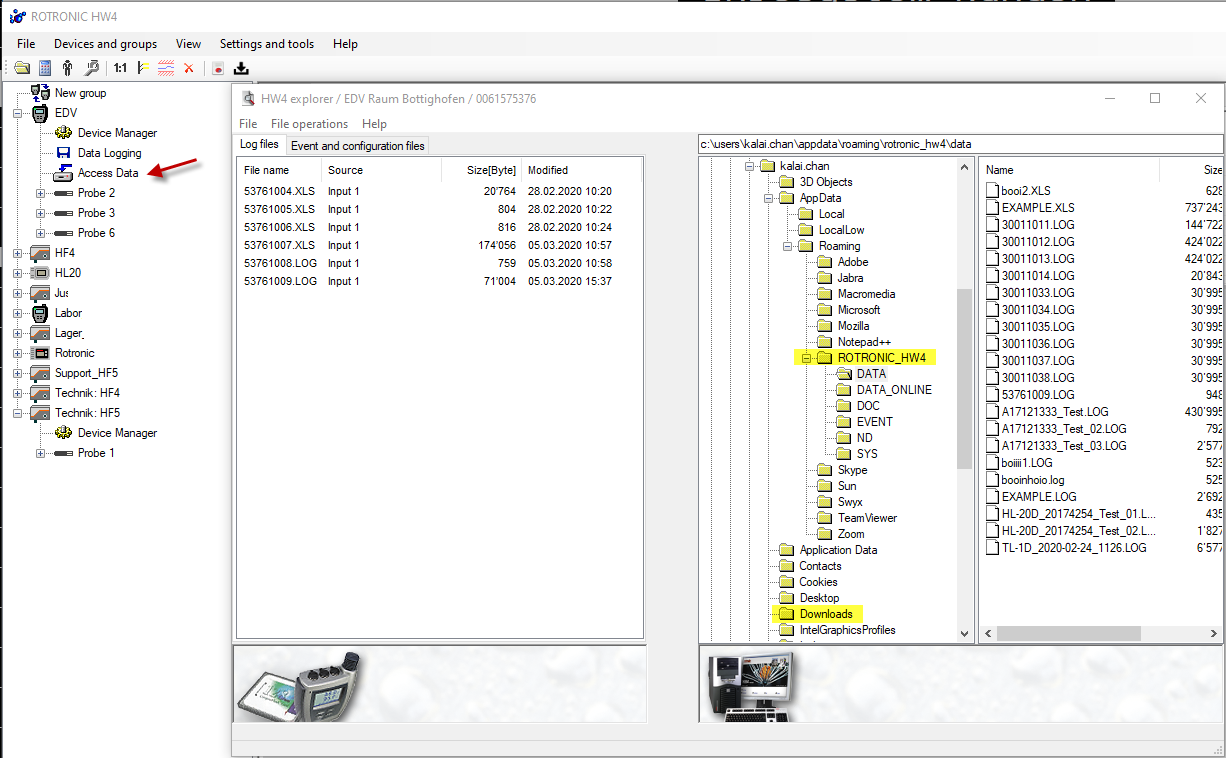
I have subfolders on Downloads. There should be also a plus to expand. Is this limited to the file locations settings in menu "Settings and tools"?
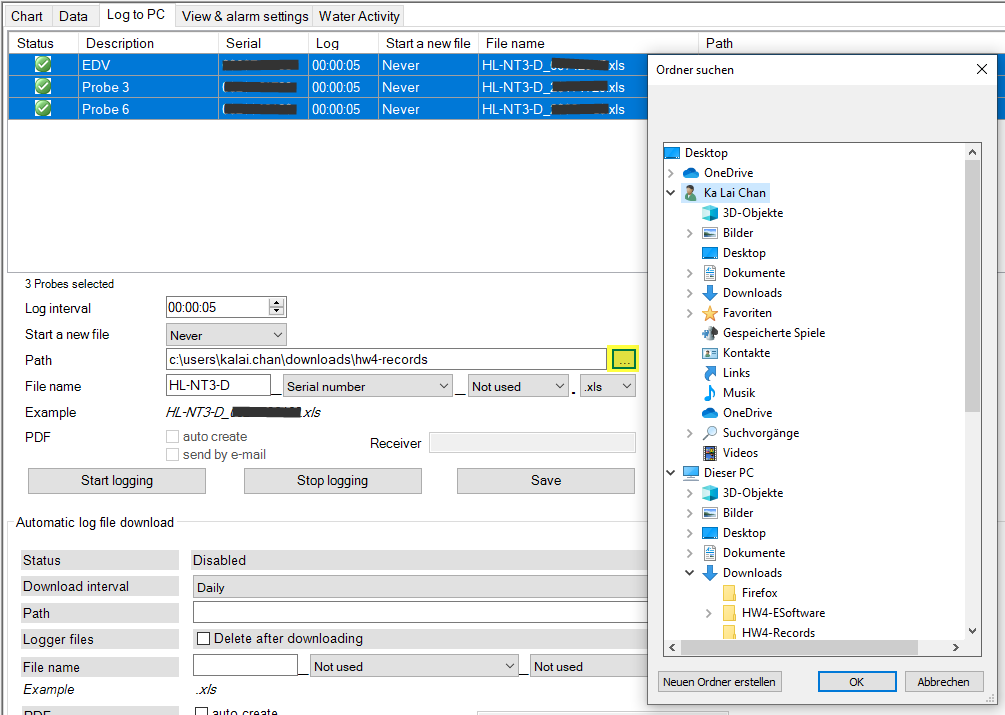
2. On the other hand at "Log to PC", I can only select folders that are not hidden. So I cannot select Roaming folder:
Thank you.
There are three places, where I can choose a folder. But I only have problems on the follow:
1. On the device, if I click on "Access Data", the HW4 Explorer opens:
I have subfolders on Downloads. There should be also a plus to expand. Is this limited to the file locations settings in menu "Settings and tools"?
2. On the other hand at "Log to PC", I can only select folders that are not hidden. So I cannot select Roaming folder:
Thank you.
Hi Ka Lai,
I can reproduce the behaviour described at 1) and 2).
1) I also tried running HW4 as administrator - but it doesn't help. It seems that the HW4 has problems accessing windows system folder.
Workaround: Copy the folder or files of your current Downloads folder to another accessable folder.
2) That is clear, that HW4 cannot display hidden folder.
Workaround: Open window explorer, set a checkmark to view -> hidden elements. Open your hidden folder as roaming, click on the address bar and copy the complete path (e. g. C:\Users\yourusername\AppData\Roaming) and paste it into the Path for logging files in the HW4. And it works fine.
I can reproduce the behaviour described at 1) and 2).
1) I also tried running HW4 as administrator - but it doesn't help. It seems that the HW4 has problems accessing windows system folder.
Workaround: Copy the folder or files of your current Downloads folder to another accessable folder.
2) That is clear, that HW4 cannot display hidden folder.
Workaround: Open window explorer, set a checkmark to view -> hidden elements. Open your hidden folder as roaming, click on the address bar and copy the complete path (e. g. C:\Users\yourusername\AppData\Roaming) and paste it into the Path for logging files in the HW4. And it works fine.
Thank you Clemens.
Hello, Ka Lai What type of HW4 explorer are you referring to? Would you please provide a screenshot?
Should you mean: Click "File" > "Open" Choose a downloads folder or file? On my PC. that is operational. I can access the subdirectory.
Should you mean: Click "File" > "Open" Choose a downloads folder or file? On my PC. that is operational. I can access the subdirectory.
Hello dokefer
Hello tenny0
If you have problems with expanding folders, please write to [email]support-rh@rotronic.ch[/email].
Thank you for your understanding.
Best regards
Hello tenny0
If you have problems with expanding folders, please write to [email]support-rh@rotronic.ch[/email].
Thank you for your understanding.
Best regards
Additionally, I tried running HW4 as administrator, but it had no effect. The HW4 appears to have issues accessing the Windows system folder.
Alternatively, you can copy the files or folder from your current Downloads folder to another accessible folder.
Alternatively, you can copy the files or folder from your current Downloads folder to another accessible folder.
No matching posts in this thread.