
Auto CSV report generation and send out through email
Hi all,
Is it possible to send out a CSV file automatically through RMS to the user?
I believe now we can automatically send out a PDF report(Chart or Table). However, PDF reports are usually hard to work with in terms of extracting raw information. Hence the user is trying to see if RMS can automatically send out a CSV file which can be picked up by their own software.
Using WEB servers, we are able to directly access into SQL database to retrieve the data. How about CLD servers? Do you have any recommendation for extracting raw data directly from CLD servers?
Is it possible to send out a CSV file automatically through RMS to the user?
I believe now we can automatically send out a PDF report(Chart or Table). However, PDF reports are usually hard to work with in terms of extracting raw information. Hence the user is trying to see if RMS can automatically send out a CSV file which can be picked up by their own software.
Using WEB servers, we are able to directly access into SQL database to retrieve the data. How about CLD servers? Do you have any recommendation for extracting raw data directly from CLD servers?
Hi Tan Han Bin
I dont know of any other way of getting .csv format data out of RMS then the following :)
But you could automate this in your browser, or make a SOP for it.
if you are using cloud, go to;
Tools-->Data Analysis-->Export-->.CSV repport.
You can define what date and time span, once done click the .csv option under export.
This procedure could be set up to be run automatically by an imacro.
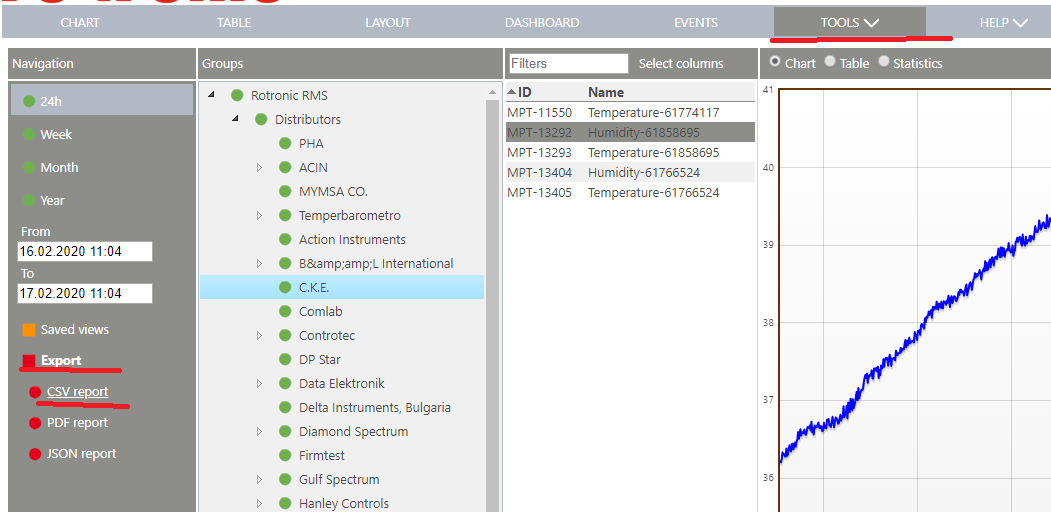
I dont know of any other way of getting .csv format data out of RMS then the following :)
But you could automate this in your browser, or make a SOP for it.
if you are using cloud, go to;
Tools-->Data Analysis-->Export-->.CSV repport.
You can define what date and time span, once done click the .csv option under export.
This procedure could be set up to be run automatically by an imacro.
Dear Emil,
Thank you for your response. I shall feedback to the customer and see if they can accept this solution.
Thank you for your response. I shall feedback to the customer and see if they can accept this solution.
Hi Tan Han Bin,
Apologies for the late response to this but potentially you can automate this,
Reports are created via a URL eg see below will export the last year of data from MPTs 14572 and 14573
https://rms.rotronic.com/rms/Report.ashx?Format=csv&from=1552484400&to=1584020400&mp=14572,14573
The only issue in terms of automation is you need to be logged in to have access to the data. Otherwise clearly RMS will reject your request due to lack of authentication and you will get a blank csv file!
Perhaps a smart programmer can solve this.
Thanks
Jeremy
Apologies for the late response to this but potentially you can automate this,
Reports are created via a URL eg see below will export the last year of data from MPTs 14572 and 14573
https://rms.rotronic.com/rms/Report.ashx?Format=csv&from=1552484400&to=1584020400&mp=14572,14573
The only issue in terms of automation is you need to be logged in to have access to the data. Otherwise clearly RMS will reject your request due to lack of authentication and you will get a blank csv file!
Perhaps a smart programmer can solve this.
Thanks
Jeremy
Dear Jeremy,
No worries. Thank you for the response.
I would like to know how is the URL actually set up. I have tried it on my own and it works pretty well. The only problem i have faced is establishing the correct from= and to= figures, basically how to determine the correct date to start and stop.
And of course the need to log in is a bit counter-intuitive in this case as it still require the user's interaction. I will look more into this and see if I have any solutions.
No worries. Thank you for the response.
I would like to know how is the URL actually set up. I have tried it on my own and it works pretty well. The only problem i have faced is establishing the correct from= and to= figures, basically how to determine the correct date to start and stop.
And of course the need to log in is a bit counter-intuitive in this case as it still require the user's interaction. I will look more into this and see if I have any solutions.
Hi Tan Han Bin,
The datetime is using Unix Epoch Time... seconds from 00:00 1st Jan 1970 (https://en.wikipedia.org/wiki/Unix_time) whlst not very human friendly it s easier for programming and keeping the URL simple.
This calculator may prove helpful https://www.epochconverter.com/
Yes the login is not helpful but obviously ensures security. I am quite sure the API was never intended to be used this way! However a clever programmer i'm sure could easily 'log in' to RMS and trigger the CSV download with human interaction - beyond my expertise though!
The datetime is using Unix Epoch Time... seconds from 00:00 1st Jan 1970 (https://en.wikipedia.org/wiki/Unix_time) whlst not very human friendly it s easier for programming and keeping the URL simple.
This calculator may prove helpful https://www.epochconverter.com/
Yes the login is not helpful but obviously ensures security. I am quite sure the API was never intended to be used this way! However a clever programmer i'm sure could easily 'log in' to RMS and trigger the CSV download with human interaction - beyond my expertise though!
No matching posts in this thread.