
RMS-CONVERTER-100 MODBUS Library
Dear all,
As the RMS-CONVERTER-100 has now got the ability to add MODBUS TCP devices, in order to save time in integrating devices, we will create an online library where the config files can be uploaded/downloaded.
Please be aware that these config files may need meet your requirements!
The are not "official" Rotronic config files, please feel free to add the config file for any device you have added in this chain.
IMPORTANT: as we are not allowed to upload .config files, please change the .config to .txt. When downloading a file simply update the name from .txt to .config.
Device overview:
Michell Optidew dew point mirror: http://www.michell.com/uk/products/optidew_401_501.htm
Climet CI-3100-25 particle counter: http://www.climet.com/products/ci3100_series.html
Airnet 510: https://www.pmeasuring.com/product/airnet-ii-continuous-particle-sensor/
Regards,
James
As the RMS-CONVERTER-100 has now got the ability to add MODBUS TCP devices, in order to save time in integrating devices, we will create an online library where the config files can be uploaded/downloaded.
Please be aware that these config files may need meet your requirements!
The are not "official" Rotronic config files, please feel free to add the config file for any device you have added in this chain.
IMPORTANT: as we are not allowed to upload .config files, please change the .config to .txt. When downloading a file simply update the name from .txt to .config.
Device overview:
Michell Optidew dew point mirror: http://www.michell.com/uk/products/optidew_401_501.htm
Climet CI-3100-25 particle counter: http://www.climet.com/products/ci3100_series.html
Airnet 510: https://www.pmeasuring.com/product/airnet-ii-continuous-particle-sensor/
Regards,
James
Michell Optidew dew point mirror: http://www.michell.com/uk/products/optidew_401_501.htm
Climet CI-3100-25 particle counter: http://www.climet.com/products/ci3100_series.html
Airnet 510 particle counter: https://www.pmeasuring.com/product/airnet-ii-continuous-particle-sensor/
Rms-8adc-l-r & rms-8tc-l-r
Rms-4tc-l-r
We have also added the Particles Plus protocol, however, the device will require that you send a MODBUS TCP command to the unit. WARNING: this cannot be done with RMS!!!
If using Red Lion E3 modules. Note that the units must be configured with 0.1 decimal accuracy to get correct readings within RMS using the preconfigured driver. This setting is made on the units via the Red Lion device web Interface > IO Channels > Analog Options > Temperature Reporting Mode.
Alternatively configure the device manually using the modbus editor with the below settings for each address 1...16 and scale as required using the 'Set Range' feature.
Modbus Command = ReadInputRegister
Address = 1
DataType = Int16
ByteOrder = Wordswap
Alternatively configure the device manually using the modbus editor with the below settings for each address 1...16 and scale as required using the 'Set Range' feature.
Modbus Command = ReadInputRegister
Address = 1
DataType = Int16
ByteOrder = Wordswap
Some guidance when using PMS devices.
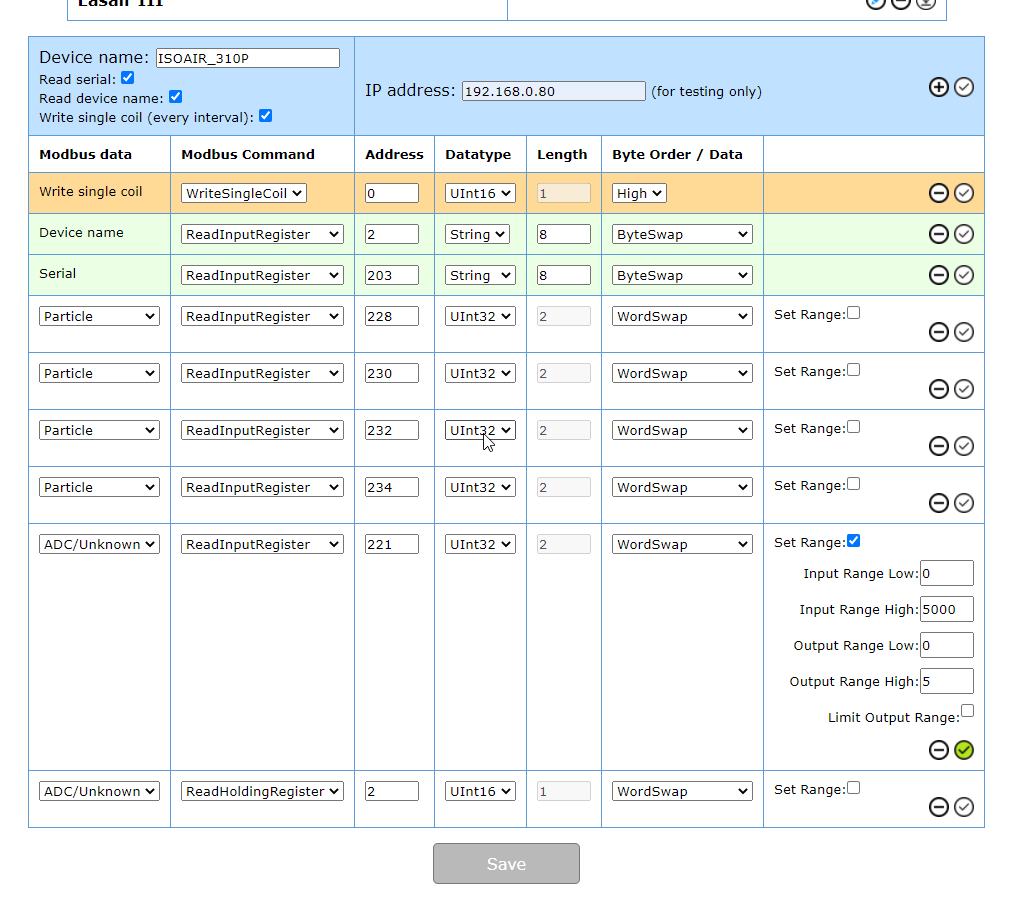
ISOAIR_310P / ISOAIR PRO-E
- First the devices must have IP address reset via Serial Cable/USB.
- Connect cable to USB port on PMS device (using supplied cable) back to PC USB port (if required using generic Serial to USB convertor cable)
- Use putty as per manual to connect to ISOAIR
- Use "set ip", "set mask" and "set gateway" commands to set IP settings (as per manual)
- Use "write" to apply settings
- Confirm with "status" command
- Additional settings likely needed
> set mode 1 (sets device to modbus mode) *** confirm value from manual
> set queue 1 (limits data queue to 1 - always the live value)
> set repeat 0 (enables continuous sampling)
> set sample 60, 60 (sets sample time to 60seconds ...)
> set inst auto 1 (sets device yo auto start)
> set inst nfc 0 (disables NFC functions)
> set inst 4ch (enables 4channel mode) *** confirm for device from manual
> write
- Connect to network and add to RMS as normal (example Modbus map attached)
LASAIR III
- First the devices must have IP address set
- Use front screen to configure IP address
- By default device is not set for continuous sampling - configure as required but be aware readings may not update like fixed devices on continuous operation mode.
- Connect to network and add to RMS as normal (example Modbus map attached)
ISOAIR_310P / ISOAIR PRO-E
- First the devices must have IP address reset via Serial Cable/USB.
- Connect cable to USB port on PMS device (using supplied cable) back to PC USB port (if required using generic Serial to USB convertor cable)
- Use putty as per manual to connect to ISOAIR
- Use "set ip", "set mask" and "set gateway" commands to set IP settings (as per manual)
- Use "write" to apply settings
- Confirm with "status" command
- Additional settings likely needed
> set mode 1 (sets device to modbus mode) *** confirm value from manual
> set queue 1 (limits data queue to 1 - always the live value)
> set repeat 0 (enables continuous sampling)
> set sample 60, 60 (sets sample time to 60seconds ...)
> set inst auto 1 (sets device yo auto start)
> set inst nfc 0 (disables NFC functions)
> set inst 4ch (enables 4channel mode) *** confirm for device from manual
> write
- Connect to network and add to RMS as normal (example Modbus map attached)
LASAIR III
- First the devices must have IP address set
- Use front screen to configure IP address
- By default device is not set for continuous sampling - configure as required but be aware readings may not update like fixed devices on continuous operation mode.
- Connect to network and add to RMS as normal (example Modbus map attached)
I tried on our system Airnet 510 by configuring the RMS convertor 100, but it did not work, I uploaded the file that is shared here in this post. Its is not detecting the device at all. For your information our RMS V1.2.0.17292 .
Hi Amjad, can you please send an E-Mail to [email]rms@rotronic.ch[/email] so that we can look at this case in more detail?
James wrote:Dear all,
As the RMS-CONVERTER-100 has now got the ability to add MODBUS TCP devices, in order to save time in integrating devices, we will create an online library where the config files can be uploaded/downloaded.
Please be aware that these config files may need meet your requirements!
The are not "official" Rotronic config files, please feel free to add the config file for any device you have added in this chain.
IMPORTANT: as we are not allowed to upload .config files, please change the .config to .txt. When downloading a file simply update the name from .txt to .config.
Device overview:
Michell Optidew dew point mirror: http://www.michell.com/uk/products/optidew_401_501.htm
Climet CI-3100-25 particle counter: http://www.climet.com/products/ci3100_series.html
Airnet 510: https://www.pmeasuring.com/cas/products/air-and-condensation-en-ch/airnet-ii-xr-particle-sensor/?_cldee=ZGFuaWVsLnNjaHVlcm1hbm5Acm90cm9uaWMuY2g%3d&recipientid=contact-ae1e1504b3c9e511aebe005056be1cc8-cdbf61b07e624800ae7fc7407134c121&esid=2c52419f-4138-ea11-a813-00224801c499
Regards,
James
Thank you James
Hello James,
Can you please check Airnet 510 link? It doesnt work.
https://www.pmeasuring.com/cas/products/air-and-condensation-en-ch/airnet-ii-xr-particle-sensor/?_cldee=ZGFuaWVsLnNjaHVlcm1hbm5Acm90cm9uaWMuY2g%3d&recipientid=contact-ae1e1504b3c9e511aebe005056be1cc8-cdbf61b07e624800ae7fc7407134c121&esid=2c52419f-4138-ea11-a813-00224801c499
Can you please check Airnet 510 link? It doesnt work.
https://www.pmeasuring.com/cas/products/air-and-condensation-en-ch/airnet-ii-xr-particle-sensor/?_cldee=ZGFuaWVsLnNjaHVlcm1hbm5Acm90cm9uaWMuY2g%3d&recipientid=contact-ae1e1504b3c9e511aebe005056be1cc8-cdbf61b07e624800ae7fc7407134c121&esid=2c52419f-4138-ea11-a813-00224801c499
Hi Natmari6117,
I've updated the links in the original posts.
Regards,
James
I've updated the links in the original posts.
Regards,
James
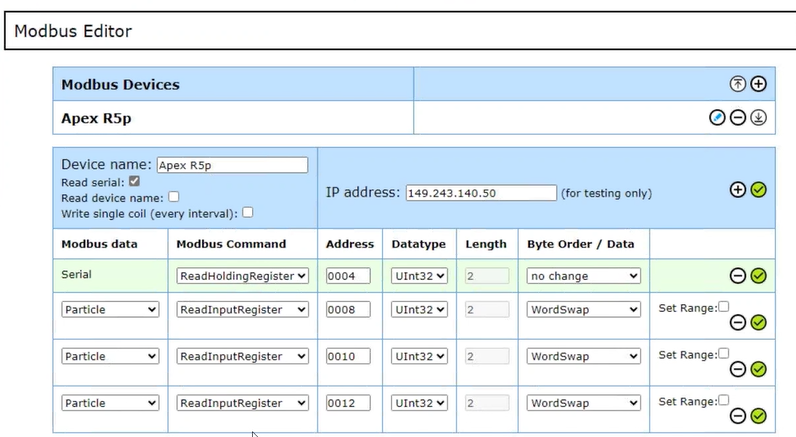
Progamming an Apex R5P within the MODBUS Editor:
Ah, cool! Sieht aus wie eine nützliche Library für Rotronic Geräte. Hoffentlich gibt's bald mehr Infos und Beispiele, wie man sie einsetzen kann. Bin gespannt drauf! Grade Calculator
James wrote:Dear all,
As the RMS-CONVERTER-100 has now got the ability to add MODBUS TCP devices, in order to save time in integrating devices, we will create an online library where the config files can be uploaded/downloaded.
Please be aware that these config files may need meet your requirements!
The are not "official" Rotronic config files, please feel free to add the config file for any device you have added in this chain.
IMPORTANT: as we are not allowed to upload .config files, please change the .config to .txt. When downloading a file simply update the name from .txt to .config.
Device overview:
Michell Optidew dew point mirror: http://www.michell.com/uk/products/optidew_401_501.htmhead basketball
Climet CI-3100-25 particle counter: http://www.climet.com/products/ci3100_series.html
Airnet 510: https://www.pmeasuring.com/product/airnet-ii-continuous-particle-sensor/
Regards,
James
Thank you for this valuable update and for setting up the online library for config files! This will undoubtedly save time and effort in integrating devices. The guidance on renaming the file extensions is also very helpful. I appreciate the effort in sharing these resources and making collaboration easier for everyone.
No matching posts in this thread.