
Send data via TCP action
Hi the manual is fairly vague on how the 'Send Data via TCP' section of an Action template works.
There are fields for IP and Data On Data Off
Some questions
1. Can you define the port eg can you put 192.1681.1:80 in the IP field?
2. When is the 'Off' message triggered (presumably when the Warning/Alarm ends or is manually closed?
3. Do you have any examples?
Thanks
There are fields for IP and Data On Data Off
Some questions
1. Can you define the port eg can you put 192.1681.1:80 in the IP field?
2. When is the 'Off' message triggered (presumably when the Warning/Alarm ends or is manually closed?
3. Do you have any examples?
Thanks
Hi Jeremy, which manual are you talking about - before I search all available manuals
The functionality is very simple. In case of an active Alarm/Warning (ON) the string (text field Data on 'ON') is sent out to the designated IP address. The address can have the form 10.11.12.13 without port or 10.11.12.13:42 for port 42 for example or even a host name with / without port.
The syntax of the data string might be free and depends on your device. That could be a modbus order, or an order to a PLC or another protocol. Tipp: Please do not forget e. g. the string termination if required from the protocoll (e. g. ' ' for carriage return - often used).
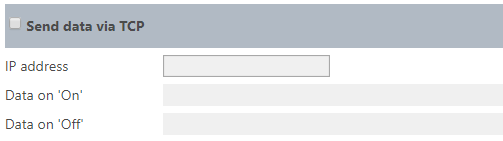
The Off message might be triggered if the Warning/Alarm ends.
The syntax of the data string might be free and depends on your device. That could be a modbus order, or an order to a PLC or another protocol. Tipp: Please do not forget e. g. the string termination if required from the protocoll (e. g. ' ' for carriage return - often used).
The Off message might be triggered if the Warning/Alarm ends.
Thank you yes this works! Carriage return and port number usage was the key information! Thanks
Currently the only option via RMS to trigger 3[SUP]rd[/SUP] party relay modules is via the “Send Data via TCP” with the Actions section of RMS. Here you can send a ASCII string to an IP device.
You can use this function to trigger the relays on a PF4. To trigger a relay on a PF4 with the following IP address 192.168.1.1:
IP Address = 192.168.1:2101
ON Command = { 99TST 1;}
OFF Command = { 99TST 0;}
You can use this function to trigger the relays on a PF4. To trigger a relay on a PF4 with the following IP address 192.168.1.1:
IP Address = 192.168.1:2101
ON Command = { 99TST 1;}
OFF Command = { 99TST 0;}
No matching posts in this thread.