
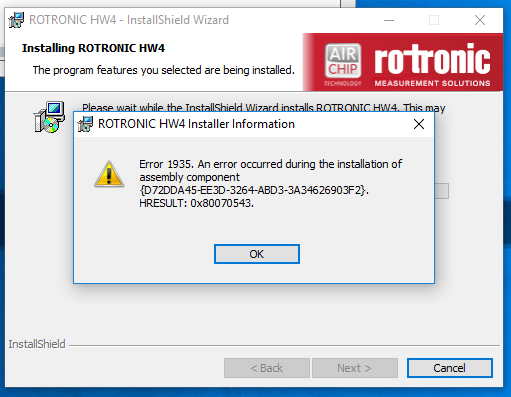
Error 1935
Have you encountered this issue before? Error 1935 while installing HW4. Running Windows 7 SP1 32-bit. Running .NET 4.5.1. Have tried installers for HW4 v3.8 and v3.9.
Hi Justin,
unfortunately I cannot open your NET.docx.
But maybe this tipp could be helpfull.
unfortunately I cannot open your NET.docx.
But maybe this tipp could be helpfull.
- Note your licence key
- Deinstall HW4 again
- open Windows explorer -> Show hidden files/folder
- Goto to C:\user\youruser\AppData\Roaming -> delete the folder Rotronic_HW4 (licence key will be lost)
- Install HW4 again.
I'm also having this issue on trying initial install. Running Windows 10.
ME_Rotronic wrote:Hi Justin,
unfortunately I cannot open your NET.docx.
But maybe this tipp could be helpfull.
- Note your licence key
- Deinstall HW4 again
- open Windows explorer -> Show hidden files/folder
- Goto to C:\user\youruser\AppData\Roaming -> delete the folder Rotronic_HW4 (licence key will be lost)
- Install HW4 again.
Before doing these steps, ensure, that you are logged in as a local administrator and the only person who is logged in. You need to be the local administrator to download and install, domain admin won't go. If multiple user are logged in, please restart the computer and log in as administrator.
No matching posts in this thread.