
RMS Demo Case Internet Connectivity on the go...
Step 1. Power the demo case and connect Laptop Ethernet <> Demo Case. Connect to a suitable open wifi with internet access (eg phone hotspot)
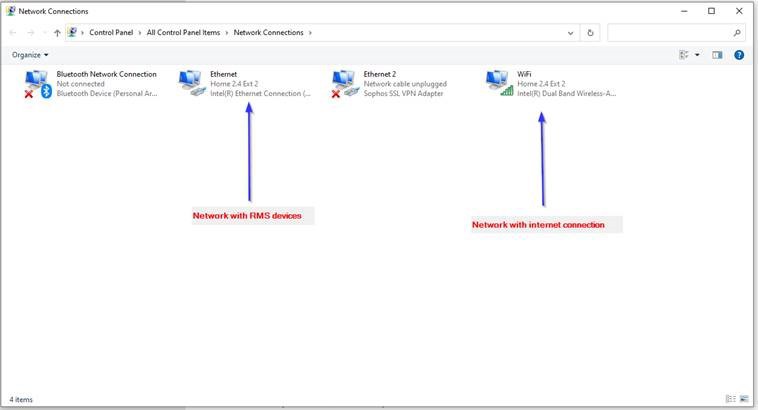
Open Network Connections in Windows:
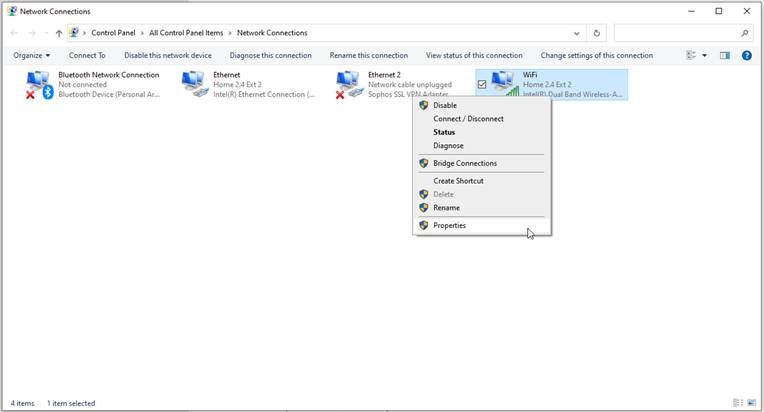
Step 2. Right click on your WiFi and choose properties:
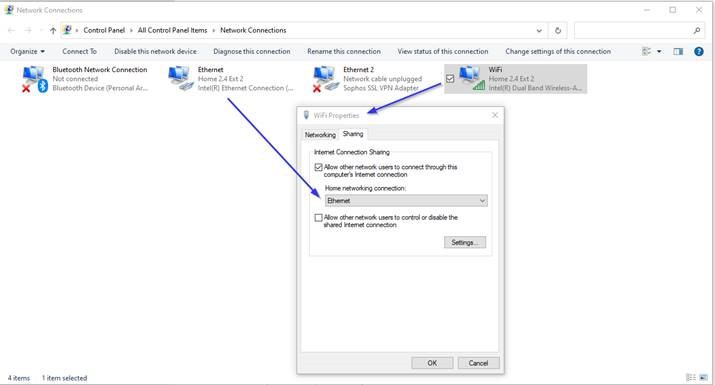
Step 3. Choose Sharing tab and enable sharing to Ethernet (the connection that RMS DEMO Case is using)
Click OK and WAIT 5 mins
Devices should obtain internet and automatically connect to RMS. LAN devices will be fastest wireless devices may take 5-10 minutes due to time synchronisation.
Open Network Connections in Windows:
Step 2. Right click on your WiFi and choose properties:
Step 3. Choose Sharing tab and enable sharing to Ethernet (the connection that RMS DEMO Case is using)
Click OK and WAIT 5 mins
Devices should obtain internet and automatically connect to RMS. LAN devices will be fastest wireless devices may take 5-10 minutes due to time synchronisation.
No matching posts in this thread.