
Direct Link to Dashboards/Layouts
We currently consider to install screens that show to status of our rooms that are beeing monitored by the RMS on the walls.
On these screens a Layout or Dashboard should be shown that allows to give a general overview over all (relevant) sensors.
However, due to hygiene rules and for practical purposes interactive monitors are not desired, i.e. we would need a static link or something similar that could be opened at system startup in the browser and does not require any interaction.
Are there ways to achieve this?
Additional, optional goal: Configure Dashboards or layouts in a way that they can be accessed with a key, i.e. no explicit user login is necessary. But I think we can manage that by some sort of automation if necessary.
On these screens a Layout or Dashboard should be shown that allows to give a general overview over all (relevant) sensors.
However, due to hygiene rules and for practical purposes interactive monitors are not desired, i.e. we would need a static link or something similar that could be opened at system startup in the browser and does not require any interaction.
Are there ways to achieve this?
Additional, optional goal: Configure Dashboards or layouts in a way that they can be accessed with a key, i.e. no explicit user login is necessary. But I think we can manage that by some sort of automation if necessary.
This is far from an official solution but a small company using RMS have implimented this 'unique' approach - seems to work.
They created the below text file and saved as a BAT file (batch file). A micro pc connected to wifi and the large monitor then runs this via task scheduler every X hours.
The code effectively closes all instances of chrome. Reloads Chrome in private mode, logs in to RMS with saved credentials and goes to the dashboard page.
Having credentials in the file is unwise but they use a guest/view only user account.
You will of course have to modify some details for your install.
They created the below text file and saved as a BAT file (batch file). A micro pc connected to wifi and the large monitor then runs this via task scheduler every X hours.
The code effectively closes all instances of chrome. Reloads Chrome in private mode, logs in to RMS with saved credentials and goes to the dashboard page.
Having credentials in the file is unwise but they use a guest/view only user account.
You will of course have to modify some details for your install.
@if (@CodeSection == @Batch) @then

@echo off
taskkill /F /IM chrome.exe /T
rem Use %SendKeys% to send keys to the keyboard buffer
set SendKeys=CScript //nologo //E:JScript "%~F0"
START CHROME --incognito "http://<RMSSERVER>/rms/Dashboard.aspx"
rem the script only works if the application in question is the active window. Set a timer to wait for it to load!
timeout /t 5
rem use the tab key to move the cursor to the login and password inputs. Most htmls interact nicely with the tab key being pressed to access quick links.
rem %SendKeys% "{TAB}"
rem now you can have it send the actual username/password to input box
%SendKeys% "{TAB}"
%SendKeys% companyname
%SendKeys% "{TAB}"
%SendKeys% username
%SendKeys% "{TAB}"
%SendKeys% password[/B]
%SendKeys% "{ENTER}"

goto :EOF

@end
// JScript section

var WshShell = WScript.CreateObject("WScript.Shell");
WshShell.SendKeys(WScript.Arguments(0));
I have reaslised the above is not suitable for RMS CLoud accounts (RMS Cloud page has more content to 'tab' past)
The below works for demo access account. Note also if company name or user have spaces in use " " to enclose.
The below works for demo access account. Note also if company name or user have spaces in use " " to enclose.
@if (@CodeSection == @Batch) @then

@echo off
taskkill /F /IM chrome.exe /T
rem Use %SendKeys% to send keys to the keyboard buffer
set SendKeys=CScript //nologo //E:JScript "%~F0"
START CHROME --incognito "http://rms.rotronic.com/rms/Dashboard.aspx"
rem the script only works if the application in question is the active window. Set a timer to wait for it to load!
timeout /t 15
rem use the tab key to move the cursor to the login and password inputs. Most htmls interact nicely with the tab key being pressed to access quick links.
rem %SendKeys% "{TAB}"
rem now you can have it send the actual username/password to input box
%SendKeys% "{TAB}"
%SendKeys% "{TAB}"
%SendKeys% "{TAB}"
%SendKeys% "{TAB}"
%SendKeys% "{TAB}"
%SendKeys% "{TAB}"
%SendKeys% "{TAB}"
%SendKeys% "{TAB}"
%SendKeys% "{TAB}"
%SendKeys% "{TAB}"
%SendKeys% "{TAB}"
%SendKeys% "{TAB}"
%SendKeys% "{TAB}"

%SendKeys% "rotronic monitoring system"
%SendKeys% "{TAB}"
%SendKeys% pst
%SendKeys% "{TAB}"
%SendKeys% 12345678
%SendKeys% "{ENTER}"

goto :EOF

@end
// JScript section

var WshShell = WScript.CreateObject("WScript.Shell");
WshShell.SendKeys(WScript.Arguments(0));
Dear all, thanks for the solutions to the login problem. They contain approaches I had not thought of (yet).
However, this still leaves the part where I want to access a certain layout or dashboard, as multiple of both might be available, and the order is not fixed / can be changed by other users, i.e. when new entries in the tree are defined. Thus, a solution using {TAB} / {ENTER} will not work reliably in the long run.
E.g. in the attachted screenshot I can easily load the URL, however then I need to click on the group and the layout I want to present. The order is not fixed, any (admin) user can easily add something in between, and groups can be found folded/unfolded, i..e. automation via keyboard/mouse commands is hardly possible at this point.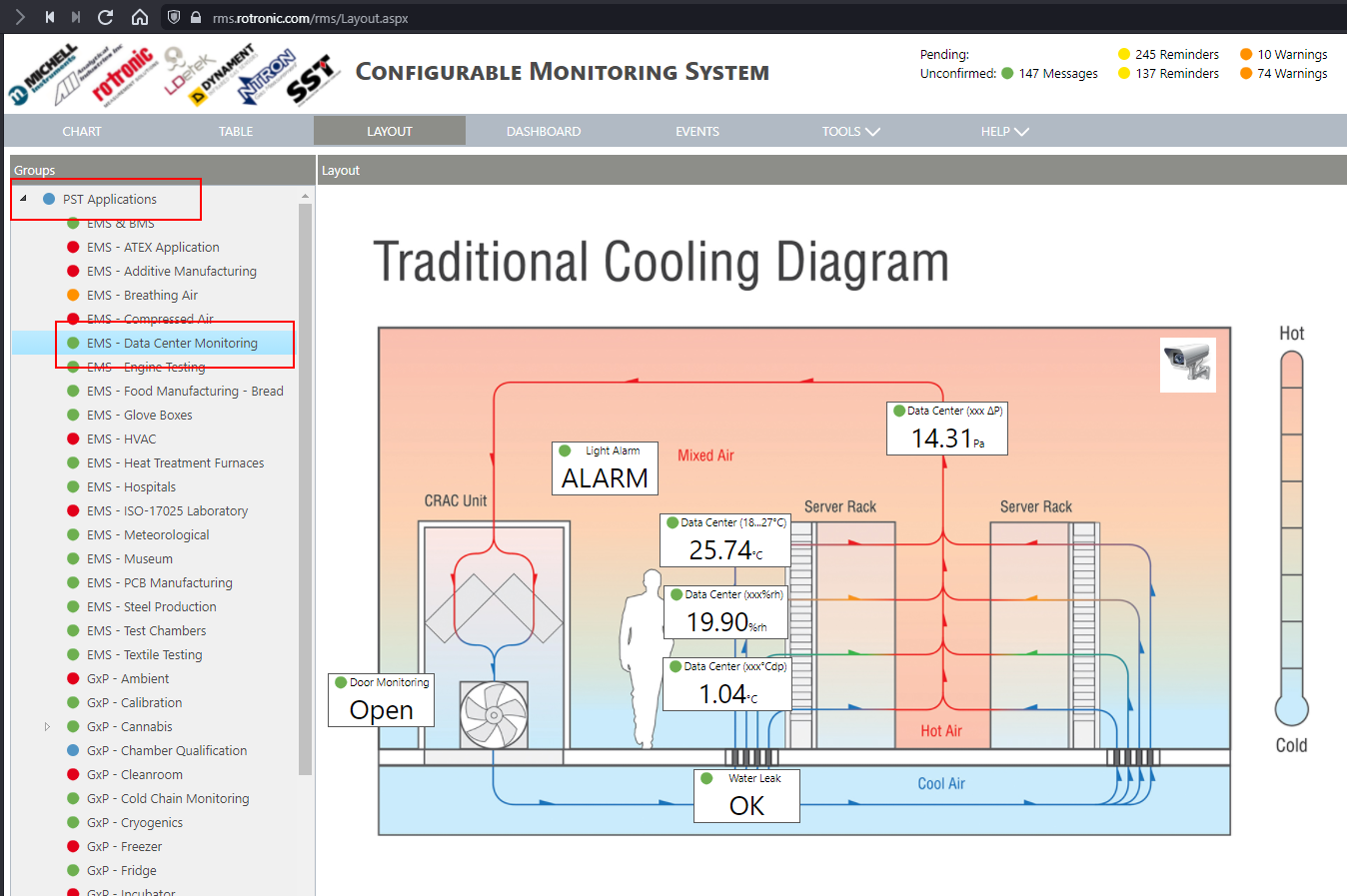
However, this still leaves the part where I want to access a certain layout or dashboard, as multiple of both might be available, and the order is not fixed / can be changed by other users, i.e. when new entries in the tree are defined. Thus, a solution using {TAB} / {ENTER} will not work reliably in the long run.
E.g. in the attachted screenshot I can easily load the URL, however then I need to click on the group and the layout I want to present. The order is not fixed, any (admin) user can easily add something in between, and groups can be found folded/unfolded, i..e. automation via keyboard/mouse commands is hardly possible at this point.
Hi Timm,
I think i have a partial solution for you. You can link to the MPT in chart view at least. Doing so will open the group that MPT is in.
eg...
https://rms.rotronic.com/RMS/Default.aspx?Id=10430 will load the Data Centre Monitoring Group of RMS demo system. Also works in Table view.
I'm looking into how to achieve this effect via the Layout view.
Thanks
I think i have a partial solution for you. You can link to the MPT in chart view at least. Doing so will open the group that MPT is in.
eg...
https://rms.rotronic.com/RMS/Default.aspx?Id=10430 will load the Data Centre Monitoring Group of RMS demo system. Also works in Table view.
I'm looking into how to achieve this effect via the Layout view.
Thanks
Hi Jeremy,
Thank you for you answer. So effectively we have to add the sensor ID (MPT-<ID>) to open the related group?!
It would be nice to find something like this for hte Layouts, too, so thanks for your effort.
Timm
Thank you for you answer. So effectively we have to add the sensor ID (MPT-<ID>) to open the related group?!
It would be nice to find something like this for hte Layouts, too, so thanks for your effort.
Timm
I've solved the Layout approach - quite easy not sure why I didnt manage this at first try.
You simple add the same text but teh Id value is related to the Group ID value...
Eg https://rms.rotronic.com/RMSbeta/Layout.aspx?Id=2318 will load group 2318. (Note that RMS demo site is now RMSbeta in the URL.)
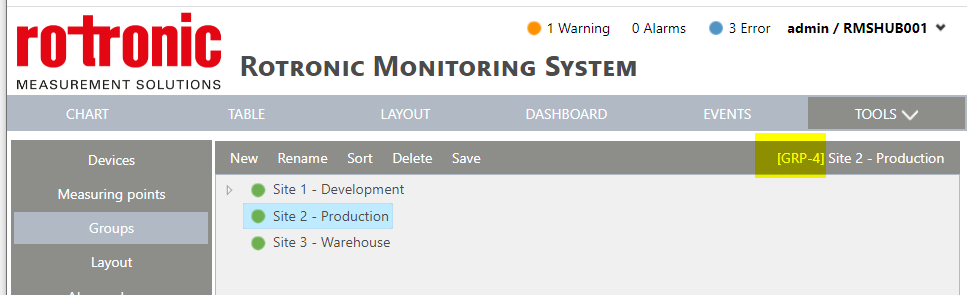
Group ID can be found in Tools > Setup > Groups > Select your group and on the top right you can see the GRP-# (see attached image)
To load into the group using the URL the group must have a layout image saved.
You simple add the same text but teh Id value is related to the Group ID value...
Eg https://rms.rotronic.com/RMSbeta/Layout.aspx?Id=2318 will load group 2318. (Note that RMS demo site is now RMSbeta in the URL.)
Group ID can be found in Tools > Setup > Groups > Select your group and on the top right you can see the GRP-# (see attached image)
To load into the group using the URL the group must have a layout image saved.
Dear Jeremy,
thanks a lot, I managed to reproduce this in our RMS cloud and this should help with our ideas.
One addition: Since I (unfortunately) only have limited rights in out cloud, you can also extract the group ID from the source code, when investigating the group link. There will be an <a id=node[ID]_anchor ..> element, from which the ID can be extracted. Admittedly, this requires somewhat extended knowlege, but is a nice alternative.
thanks a lot, I managed to reproduce this in our RMS cloud and this should help with our ideas.
One addition: Since I (unfortunately) only have limited rights in out cloud, you can also extract the group ID from the source code, when investigating the group link. There will be an <a id=node[ID]_anchor ..> element, from which the ID can be extracted. Admittedly, this requires somewhat extended knowlege, but is a nice alternative.
No matching posts in this thread.