
Information: RMS Software V1.3.1 Upload the property file and firmware update
If you use the RMS-Software 1.3.1 and got the error message "Error reading the device properties" while you read the Properties you need to upload the property-file of the device.
Reason:
New devices aren't implemented in the RMS-software, if you can't read out the properties for example the RMS-LOG-T30-868, it's necessary to upload the device definitions of the device.
1. Tools--> Setup choose the device for example the RMS-LOG-T30-868
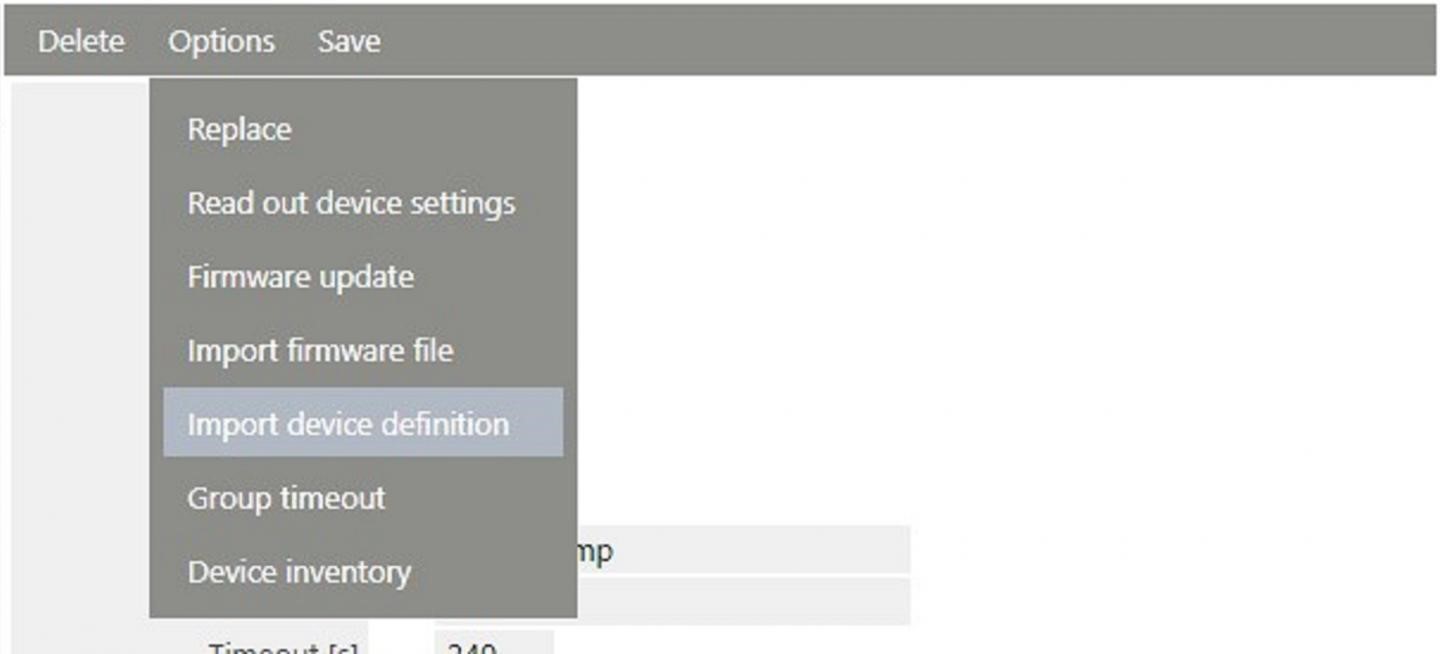
2. Options --> "Import device definitions" and upload the definition file
3. Options --> Read out device settings
4. after a interval it's possible to change the device settings
There is a issue of the RMS-Software (Version 1.3.1) to update the firmware of these devices . If you press the button "Firmware-Update" and the error message pops "NoPropertyData" up. This issue is fixed in the RMS-Software V2.0.
Please inform your distributor and send them the devices. The distributor will help you and update your devices.
Reason:
New devices aren't implemented in the RMS-software, if you can't read out the properties for example the RMS-LOG-T30-868, it's necessary to upload the device definitions of the device.
1. Tools--> Setup choose the device for example the RMS-LOG-T30-868
2. Options --> "Import device definitions" and upload the definition file
3. Options --> Read out device settings
4. after a interval it's possible to change the device settings
There is a issue of the RMS-Software (Version 1.3.1) to update the firmware of these devices . If you press the button "Firmware-Update" and the error message pops "NoPropertyData" up. This issue is fixed in the RMS-Software V2.0.
Please inform your distributor and send them the devices. The distributor will help you and update your devices.
No matching content in this article.